Comparison
Patchify vs Visio for AV documentation
Visio is a general diagramming tool that many AV engineers use for signal flow and racks. Patchify is built only for AV systems: every device carries its inputs and outputs, so the drawing also produces the cable schedule, racks and labels. This page uses Microsoft's own published information, checked on 9 October 2026.
Written by Callum Buckley ·
30-day free trial. No credit card needed.
What does Visio do well for AV?
- Price: Visio Plan 1 is $5 per user per month and Plan 2 is $15, both on an annual subscription. Visio in Microsoft 365 comes with commercial Microsoft 365 plans at no extra charge.
- Shapes: Plan 2 lists 250,000+ shapes, and custom shapes with programmability.
- Desktop and offline: Plan 2 includes the desktop app with offline and local file support.
- CAD and data: Plan 2 lists AutoCAD file support, data graphics and data connectivity with two-way sync.
- Shared files: clients and consultants who use Visio can open your drawings.
What do AV stencils leave to you?
In Visio a device is a shape and a cable is a line. The drawing does not know that a port is an SDI output or that a line joins two ports, so the work around it stays manual:
- Cable numbers are typed by hand and renumbered by hand.
- The cable schedule is a separate spreadsheet that has to be kept in step with the drawing.
- Nothing stops a line from an HDMI output to an SDI input.
- Rack elevations and labels are separate drawings.
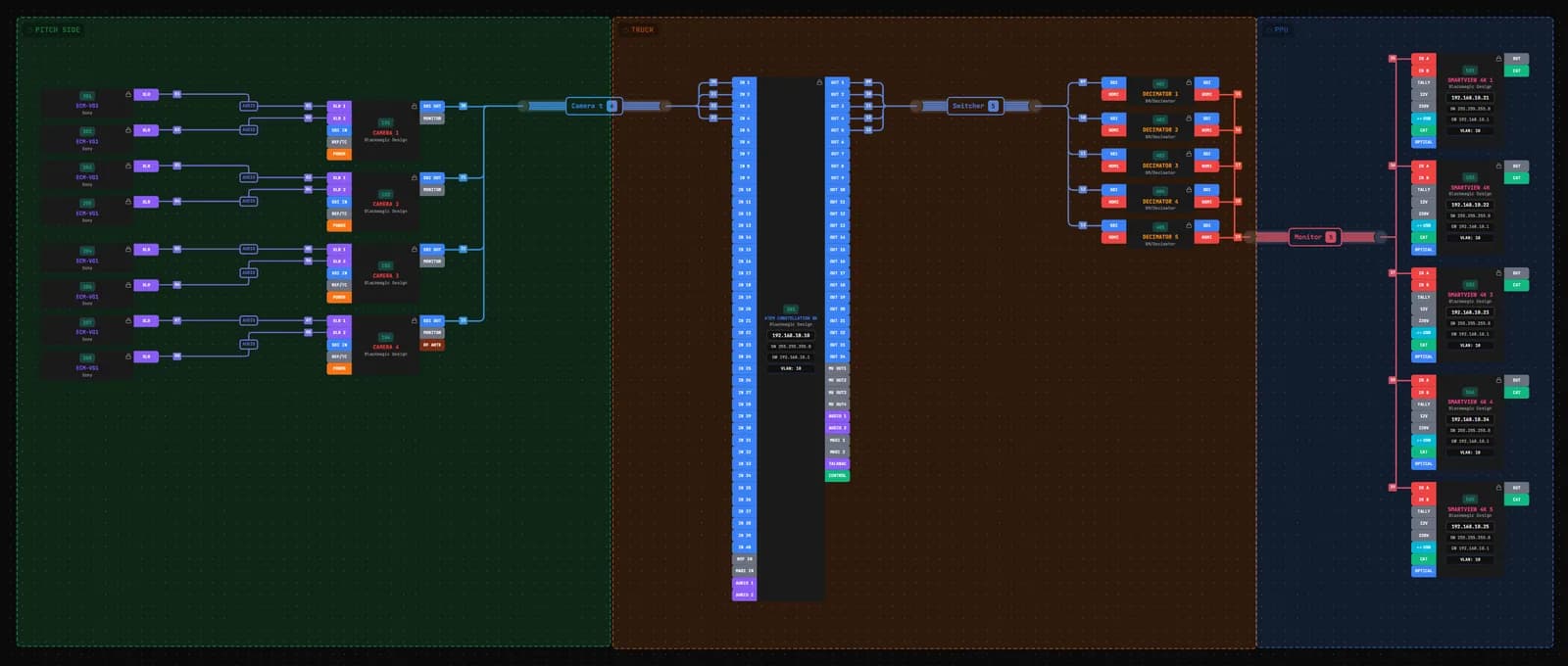
In Patchify each device comes from the library with its ports and signal types. Drawing a cable sets its number, its signal and its row in the cable schedule, and a cable between incompatible signals is refused unless you allow it. See AV diagram software for a worked example.
How do the prices compare? (checked 9 October 2026)
| Visio | Patchify | |
|---|---|---|
| Included / free | Visio in Microsoft 365: web app, basic diagrams | Free account: 1 project, view only |
| Entry plan | Plan 1: $5/user/month, annual. Web and Teams, no desktop app | Starter: $15/month or $150/year |
| Full plan | Plan 2: $15/user/month, annual. Adds the desktop app | Pro: $30/month or $300/year |
| Teams | Per user | Team: $100/month for 5 members. Business: $250/month for 15 |
| Trial | 30 days for first-time users of Plan 1 or 2 | 30 days, no credit card |
Visio costs less per person. What Patchify adds for the price is the AV-specific output: the cable schedule, racks, patch panels, labels and a bill of materials from one drawing.
Can I bring existing Visio drawings across?
Patchify does not import Visio files. Moving a job across means placing the devices from the library and drawing the cables again. These help:
- Import a kit list from Excel or CSV to get the devices into the project.
- Search the gear library first; build any missing device once and reuse it.
- Start new jobs in Patchify and keep finished ones in Visio.
When should you stay on Visio?
- Your organisation already has Visio through Microsoft 365 and your diagrams are simple.
- You draw many kinds of diagram, not only AV systems.
- You need Visio's data linking, or files that clients edit in Visio.
- You rely on manufacturer stencils that you have built up over years.
When is Patchify the better choice?
- You keep a cable schedule by hand next to the drawing and want it generated instead.
- You want racks, patch panels and labels from the same devices.
- You want connections checked by signal type.
- You need a priced bill of materials and job sheets for the crew.
Sources
- Visio plans and prices: microsoft.com Visio plans (checked 9 October 2026)
- Patchify plans: patchify.app/pricing
Microsoft and Visio are trademarks of Microsoft Corporation. Prices change; check the vendor's site before you buy. If anything here is out of date, email [email protected] and we will correct it.
Try it on your next job
Draw the system once and get the cable schedule, rack and PDF pack from the same project.